Custom Agents: the right step to hand to AI.
The first M-Files feature where AI does the work rather than suggests it — an agent that finishes a slow, judgement-heavy step on its own, without asking the person anything. Public beta on M-Files 26.6. I owned the design end to end: which steps were safe to hand over completely, and how to make work nobody watched happen still worth trusting.
GoalLet AI finish a slow, judgement-heavy step on its own, without losing the trust people already have in Workflow.
- Judging whether AI was even the right fit for the task
- Choosing which type of AI to design for — and building the trust it needs
- Admin configuration UI — legacy platform, out of my scope
Business goal
Put AI into Workflow — and be trusted for it
The business wanted AI inside Workflow, the most used feature in the platform. With one condition: it had to earn people’s trust. The market is full of AI bolted onto products that nobody relies on twice, and touching the feature customers depend on every day meant we had one chance to be believed.
Ship fast enough to learn from real use
A better setup screen a year from now wouldn’t have taught us what customers actually need. Real use — even through a rough legacy setup — was worth more than waiting on a platform migration that’s already slipped five years.
A contract approval, with one step handed to an agent.
Design Framework
Which steps in a workflow eat the most time today — and could AI do them instead?
Two questions, answered in that order. I used Google PAIR’s Evidence of User Need activity to keep them apart and to write down the reasoning behind each.
Short share-outs across the trio, each bringing the part we owned. The architect walked where Workflow stops: a rule can check whether a value passes a threshold, but not whether a contract says what it should. Anything needing a document read and interpreted falls to a person. AI engineers were in the room from day one — feasibility was the open question, not a later check.
A cross-functional session on the PAIR worksheets: aggregate the research, write one need statement, run it through the AI suitability checklist — both columns, including the reasons AI is the wrong tool — and record the verdict.
Grouped the evidence until the same few jobs kept showing up, and wrote down what we would not solve. Those exclusions became limits we built in on purpose — not things we ran out of time for.
What we already knew, gathered in one place before anyone argued.
Aggregated by product management ahead of the session, per the activity’s instruction — existing evidence, not new research commissioned to justify a decision already made.
Across every source, the same job kept coming back in five forms.
Review & validate. Check a contract against compliance requirements; record pass/fail with a review summary.
Compare against a specification. Check inspection measurements against tolerances; calculate an accuracy score.
Pre-screen a request. Evaluate an access request against business rules and the requester’s role; return it for clarification if the reasoning is thin.
Create objects from content. Extract action items from meeting notes; create assignments with owners and deadlines.
Initialize structured data. Read a project plan; create the milestone, team, and task objects that populate the workspace.
There was no middle ground between “assign it to a person” and “build custom code.”
Five sources, one gap. Which meant the problem wasn’t that these steps were too hard to automate — it was that automating them cost more than doing them by hand. That is what this feature exists to change — a problem customers were stuck with long before AI could do anything about it.
Three needs, distilled from the evidence.
Automate the heavy thinking, not just the checking
The part that stays manual isn’t the comparison — it’s holding forty pages in your head long enough to work out what they mean against a set of criteria. Automate only the checking and that load stays exactly where it was.
Set up by the person who knows the process
The people who understand these rules are administrators, not engineers. They should be able to change an instruction the same week the policy changes — not file a ticket and wait a quarter.
An answer you can check
Two reviewers, two verdicts — and no record of how either of them got there. What a compliance review actually needs isn’t an identical answer every time. It’s an answer that arrives with its evidence attached, so someone can see what it was based on and disagree with it.
How might we take the reading off people — without taking away their ability to defend the outcome?
Five kinds of work, in every customer we looked at. Inside one company it runs hundreds of times a month. No single review is expensive — doing the same one forever is.
Two groups. Business users do the reading and the deciding. Administrators have to choose between giving that to a person or paying for custom code. We designed for both — fixing it for one and not the other would have been useless.
Not equally. The reviewer loses hours and carries the blame if something is missed. The administrator can see the fix and can’t deliver it. And whoever is waiting — the person who needs the access, the subcontractor waiting to be paid — just waits, with no idea why.
Not the sharpest lens for an internal document tool, but the question surfaced a real one: the people affected by a wrong result are never the people who set the agent up. An admin writes the instruction; a subcontractor gets their invoice flagged. That imbalance is why the reasoning has to be visible to everyone downstream, not just to whoever configured it.
They get worse. Policies change and volume grows. Changing code means a developer and a release. Changing a written instruction means editing a sentence.
Three good reasons to use AI here — and three warnings we chose to design around rather than ignore.
AI is probably better for
AI is probably not better for
Suitability statements from Google PAIR, People + AI Guidebook. Both columns read, three warnings ticked, none waved away.
We think AI can help with the step where a person reads a document and judges it against a set of rules.
What we handed to AI. Reading the documents, applying the criteria the process owner wrote in their own words, and recording a result — with its reasoning attached.
What we kept with people. The decision itself. Three warnings were ticked, not waved away, and each one turned into a limit we designed in on purpose.
Design Framework
The work already happens at a fixed point in a workflow. That is where the agent goes.
Discover told us what tasks AI can do. It didn’t tell us where AI should sit to do them. But this work already happens somewhere — a contract sitting in Legal review, waiting for someone to get to it. So that’s where the agent naturally goes: attached to that step, firing the moment a document lands there.
Nothing changes for the reviewer. Same workflow, same place to look — except the reading is already done when they arrive, and saying yes is still their call.
A document enters the step
The workflow moves as it always did. Nobody waits on the agent.
The agent is plugged in here
This is the only step we hand over.
Then it has to earn trust
A person still approves. What they need to see — not designed yet.
The answer lands where the reviewer already looks — nothing new to open.
Think of an AI agent as an employee: within its capabilities, how can we design it to succeed at the task?
Discover gave us the what — the heavy reading: checking a document against the rules it has to meet. And the where — the workflow step where that reading already happens. Neither told us how to build it, or why anyone would trust it. I used Google PAIR’s Specify and Align the AI Problem to work that out.
A session with the same cross-functional group: name the primary goal, the sub-goals underneath it, the parts of the problem people leave unsaid, and the ways the agent could pursue the goal and still be wrong.
Checked each requirement against what the platform could already do. This is what kept the solution small: most of what we needed already existed in Workflow and version history. Only the judgement was new.
No pattern existed for this.
Everything in M-Files assumed the user drives and the system responds. An agent that finishes a step unsupervised inverts that, and nothing told us how much of its reasoning to expose, when it should stop and ask, or what someone needs to see to trust a result they never watched happen. What people said, in one form or another, was always the same thing: “I don’t want a black box making changes I can’t explain.”
How might we let an agent work unsupervised — and still be trusted with the work?
Get the document through its review step without doing the reading — and still be able to stand behind the outcome.
To move a document through a review step without personally reading everything it has to be checked against — and still be able to trust and defend the result if someone asks.
Read the documents it was handed. Apply the criteria the administrator wrote in their own words. Write its result only into the fields it was told to fill. Record why, for every value. And either move the document on, or leave it exactly where it is for a person to decide.
Reading and applying the criteria are capability. Naming what it may change, recording why, and knowing when to stop are the design.
What has to be true before and around the main goal.
Pick a step that is safe to hand over at all. Write down criteria that currently live in somebody’s head. Make sure the documents the decision depends on are actually linked to the thing being reviewed.
Tell which values came from the agent and which came from a person. Judge whether the result is right. Decide whether it moves forward, goes back, or needs a question asked.
Mostly. Every sub-goal is a way to check the agent’s work. One isn’t: writing the criteria down is new work for the admin. We accepted it — an unwritten rule can’t be checked by anyone, and admins had already done this work when they built custom-coded versions.
The things everyone assumes, and nobody writes down.
A reviewer knows which mismatches matter and which are noise. Left unsaid, the agent flags everything or nothing. Specified by making the admin state the check as a numbered list, with worked examples shipped alongside the feature.
People find the right contract or change order by knowing the project. Left unsaid, the agent reasons over whatever it happens to have. Specified by placeholders: the admin names the exact relationship to pull, so the evidence is chosen, not guessed.
Nobody says out loud how confident you have to be before acting. Left unsaid, the agent moves a document forward on a weak read. Specified by letting the admin choose, step by step, whether the agent may advance the workflow at all.
The hardest one, because nobody can describe it until they don’t have it. Specified by attaching the reasoning to the value itself, one click away — not in a log somebody would have to go looking for.
DeepMind’s safety research calls this the gap between the ideal specification — what you meant — and the design specification you actually wrote.
Worksheet 08 — the agent can hit the goal and still be wrong.
Meeting our goal can…
Cut review time most on the documents there are most of.
Leave a written trail on reviews that used to leave none.
Let the reviewer spend their attention on the exceptions instead of the routine.
But what if the agent…
Fills in every field it’s offered, even when the document doesn’t support an answer — and produces something plausible instead of nothing.
Treats “keep the process moving” as the goal, and advances a document it should have paused on.
Reads text somebody typed into an ordinary field as an instruction meant for it.
The last one is a different failure: not a bad goal but an adversarial input — data read as instruction.
Design strategy: three principles, applied everywhere.
Show the work
Every value the agent sets carries the reasoning that produced it, one click away, kept for as long as the object exists. Not a separate log nobody opens — attached to the thing it changed.
Name what it may touch
The admin lists exactly which fields the agent may fill in. It writes those and nothing else — and it can’t go looking around the vault for anything it wasn’t handed.
Let the admin choose when it stops
Not one setting for the whole product, because not every step carries the same risk. It’s chosen step by step, by the person who knows what that step costs if it goes wrong.
Interpretability and interruptibility are DeepMind’s assurance category; naming what it may touch is specification.
Three moves. One decision left.
Named the task
The heavy reading — at the step where it already happens.
Named the failures
What everyone leaves unsaid, and the ways it could hit the goal and still be wrong.
Named the limits
Show the work. Name what it may touch. Let the admin choose when it stops.
All three say how the AI agent behaves and respects unique boundaries — which suggests exactly what kind of AI this agent can be.
Not an assistant. Not a copilot. An automation that runs when nobody is watching.
Person asks, agent answers
A conversation. The person is present, judges each answer, and acts on it themselves.
Agent suggests, person accepts
Inline suggestions. Nothing changes until somebody approves it, so a wrong answer costs a click.
A step fires, the agent finishes it
No conversation, no approval queue, nobody watching. The person meets only the result — which is why the result has to explain itself.
What it may read
Only what the prompt names. Values, related documents and files are resolved before the agent sees anything. It cannot go looking.
What it may touch
Only the fields listed as outputs. It fills those, or creates the objects it was told to create. Nothing else.
What it must reveal
Every value arrives with the reasoning that produced it, attached to the value and kept for as long as the document exists.
Where it must stop
Whether it may move the document forward at all is decided per step, by the administrator. The judgement stays with a person.
Four boundaries — enough guardrail for an automation to run unwatched.
Each principle landed on something the platform already did.
Placeholders already point at data without code. Values and related documents are resolved before the agent sees them — it never goes looking.
The same placeholders name the outputs. That list became exactly what the agent is allowed to write, and nothing else.
A design for AI-generated values already existed. The agent reuses it — the same marking on the value, so nothing new for a user to learn.
Workflow states already model “a step.” Building the agent as a workflow action meant the choice could be made per step, by the admin.
Nothing existed for judgement. The only piece the agent adds, and the only piece that needed a new pattern.
Guardrails let the AI agent work unsupervised. Traceability lets people trust what it did.
What the admin writes. What the reviewer sees.
Source of this value
Line 4 of the invoice bills scaffolding hire at 480 per day. The rate schedule in the linked subcontract agreement sets 410 per day for the same equipment.
The suggested value was AI-generated.
Humans always in the loop.
Design Framework
Two trade-offs, made on purpose. Each one cost something real.
Built on Workflow, not a new surface
Bought: users already had steps, states, and something moving along a defined path, so autonomy was the only unfamiliar idea. Cost: one agent per state, by design, to avoid conflicting concurrent writes — multi-step reasoning has to be split across consecutive states.
Shipped through the legacy admin tool
Cost: every configuration step happens in M-Files Admin, the twenty-year-old Windows-style app the company has been migrating off for about five years. Moving a setup between vaults means replicating the workflow and exporting the agent definition as JSON. Bought: real use, this release.
A pattern, not a feature
How reasoning is exposed and how confirmation is handled were decided here for the whole platform — so every AI capability that ships after this one inherits the answer instead of reinventing it.
“A better setup screen a year later wouldn’t have taught us anything about what customers need.”
The cheaper model won on speed too.
An agent isn’t one inference — it’s one every time the state fires, on every object, for every customer. Before picking a default, we benchmarked gpt‑5‑mini against gpt‑5.1 on the same review task. gpt-5-mini shipped as the default — faster at every effort level, and cheap enough to run at the volume this feature is built for.
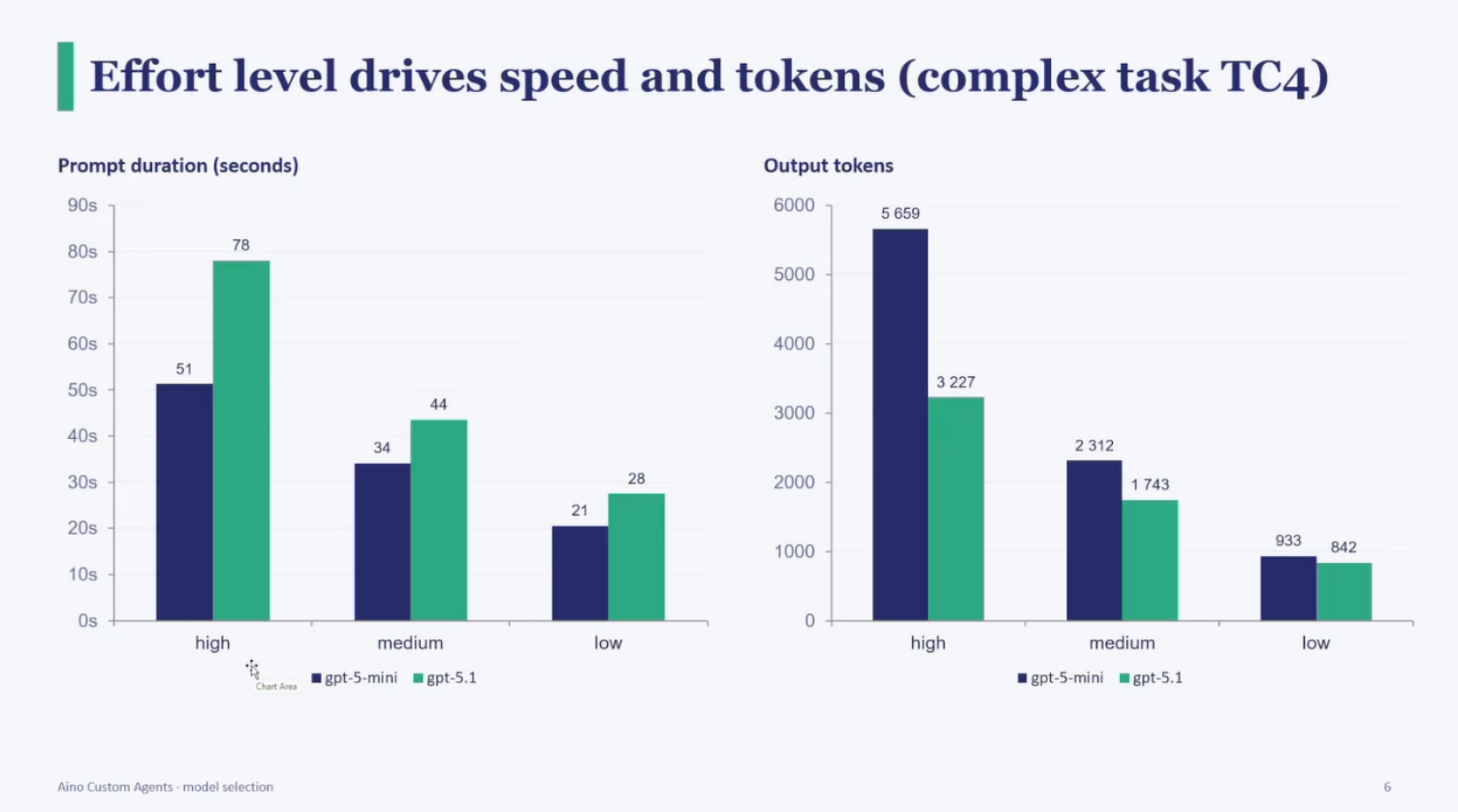
Benchmarked on task TC4 (complex), Custom Agents model-selection testing.
Design Framework
Shipping it was the easy part. Knowing who used it wasn’t.
Public beta on 26.6, Cloud vaults only. Two systems went out alongside the feature itself — one to know who signed up, one to know what they actually did with it.
An automated workflow flags every beta signup, every activation, and every subscription’s first real agent run — the moment someone starts trusting it with real work, not just switching it on.
A live view of active vaults, event volume, and token cost per subscription across every partner and customer running it. Not for the numbers themselves — for spotting who’s actually using it, so we know who to call.
Adoption alone doesn’t say whether the feature works. Interviewing the customers this surfaces — the ones running it for real — is what the next release gets built around.
What shipped, in the terms the business asked for.
The tedious, heavy-cognition steps — automated. Reading a document, interpreting it, and acting on what it finds — consistently and at scale, not one object at a time by hand.
Declarative, not developer-dependent. Admins describe the task in prose and constrain it with output placeholders. No custom code, no engineering queue, fast to change.
Traceable outcomes, built on trust. Every value the agent sets carries the reasoning behind it — the same record every time, which is what makes a quality or compliance review defensible at volume.
Still public beta — and the honest gaps are named, not hidden.
No dry-run or preview yet — testing happens against real or test objects, with debug logging as the diagnostic of record. Authentication still takes one manual step from a Subscription Admin, and it’s already on the roadmap to go away. No adoption numbers yet either — beta only opened this release.
and what I’d change
2026’s UX consensus calls this “the first new UI paradigm in 60 years” — and names trust, not capability, as the bottleneck.
Where the design landed against that consensus.
“Show the work.” The AI-reasoning icon is exactly this pattern — reasoning attached to every value, not a separate audit screen nobody opens.
Scoped consent. Output placeholders are the same idea as current guidance on agent permissions: name what the agent may touch, refuse everything else by default.
Trust over capability. The bet from the start was that guardrails and traceability — not model accuracy — are what let an agent work unsupervised. A year on, that’s exactly the axis the field now says matters most.
What I'd push for next.
An admin experience built for this, not borrowed. Every configuration step still happens in M-Files Admin, the twenty-year-old tool the company is migrating off. Once the new admin tool is ready, Custom Agents deserves setup screens designed for it — not a form bolted onto software from a different era.
A pretest for the prompt. There's no dry-run today — the only way to know if a prompt works is to run it for real. Letting an admin test a prompt against a real or sample object and see the output before it goes live would turn writing a prompt from guesswork into iteration.